AI as a Craft Teaching Guide
Teaching is a craft
You already know teaching is a craft. You have spent years building a feel for it: when to pause, when to push, which analogy lands with which room. This guide is about bringing AI into that craft without hollowing it out.
Working with AI as a craft, as introduced in the AI as a Craft training, means one thing above all: the thinking stays yours and yours is the hand that guides AI. AI can hand you a finished-looking lecture in four seconds with nothing of you in it, and from the back of the room nobody can tell. For a week or two. Then students start asking questions the slides can't answer, and everybody can tell.
So this guide is not a set of rules for permitted use, and it is not a form to complete. It is a way of working where you can tell the good from the rubbish, your judgement is in everything you use, and you can stand behind whatever carries your name into a classroom.
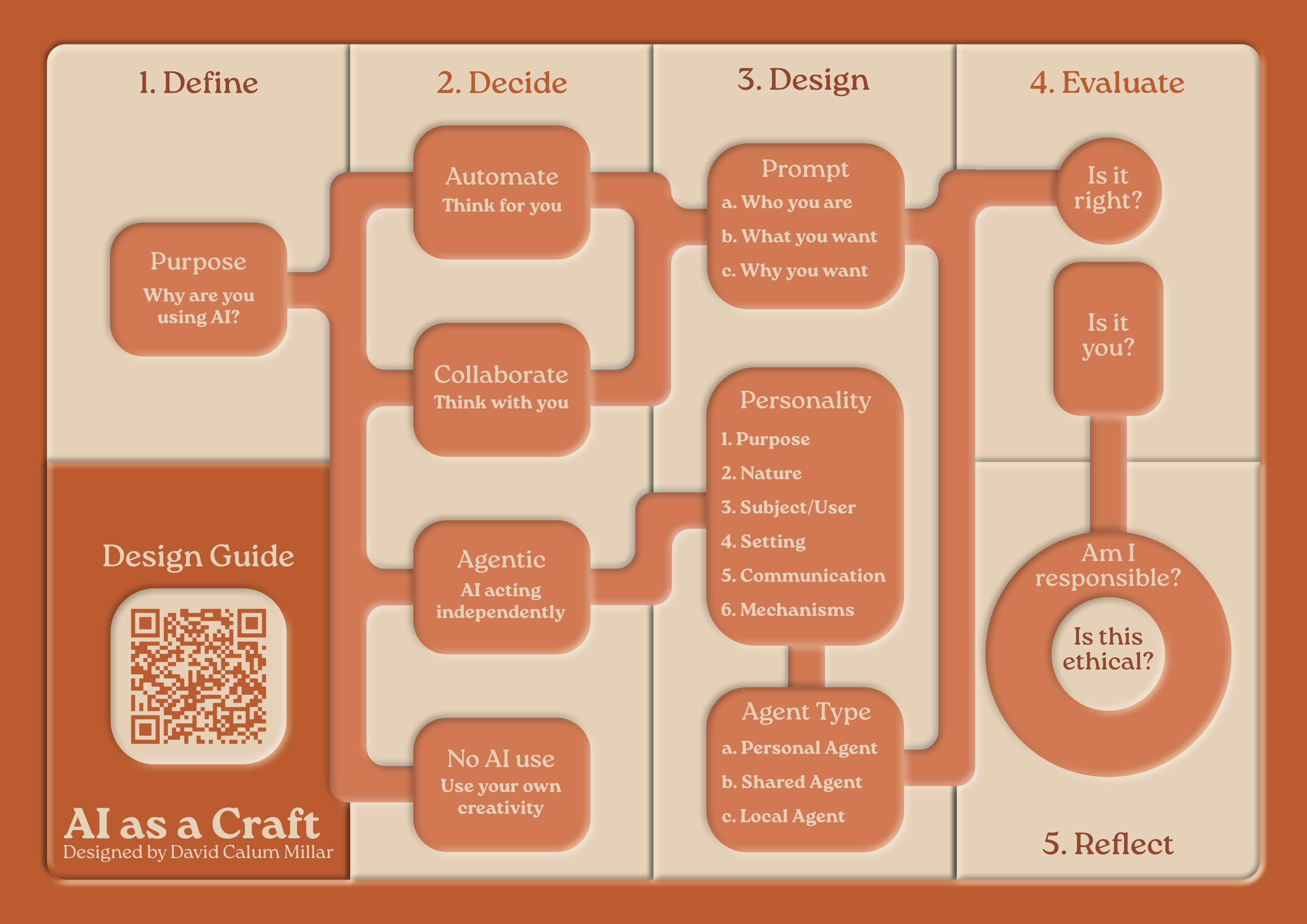
The Five Stages: Why, How, Design, Evaluate, Reflect
Every time you approach AI in your teaching, you'll follow the same short journey. At first you will walk through these steps deliberately, then in time you'll stop thinking about it as it becomes natural, which is when you've achieved fluency.
1. Why? Purpose
Before you even think about using AI, you need to think about what you're trying to achieve. Not which tool. Not which prompt. Why. Why it's important. What does this task actually need? Sometimes the honest answer is that the task is drudgery and your time is better spent with students. Sometimes the honest answer is that you're avoiding the thinking that you should be doing yourself. You need to be honest about what you're trying to achieve and why AI would enhance that.
2. How? Choose your door
Four doors, and matching the door to the job is most of the skill.
AUTOMATE: It thinks for you
You define the task clearly, AI executes it, you check the result. For routine, repeatable work where you can say exactly what good looks like.
Teaching examples: Generating quiz questions at different difficulty levels, creating multiple versions of explanations, summarising lengthy readings, producing practice exercises.
COLLABORATE: It thinks with you
You and AI work it out together, building on each other's contributions through dialogue. For complex work where the process itself generates insight.
Teaching examples: Developing case studies that challenge assumptions, refining explanations until they genuinely illuminate, creating scaffolded activities, designing discussion prompts that bridge theory to practice.
AGENTIC: It acts independently
You design an agent once and it works without you, including with your students. For support that shouldn't require your constant presence.
Teaching examples: Course FAQ assistants answering common questions at midnight, feedback companions that turn your marking notes into constructive feedback, simulations students can practise inside.
NO AI: Use your own creativity
The door people forget is a door, and often the most important one. You deliberately keep AI out because the moment requires an actual human being.
Teaching examples: Facilitated discussions requiring real-time reading of the room, one-to-one pastoral support, sharing personal professional experience, responding to the unexpected. Nobody wants a comforting word that was generated.
3. Design: Who you are, what you want, and why
Whichever door you take (except the fourth), the way in is the same. Tell it who you are, what you want, and why, before any of the particulars. Don't open with "Create a lecture on thermodynamics". Build context: who your students are, where they struggle, what you have tried, what good looks like in your discipline. For agentic work, this becomes designing a full character using the six boxes: Purpose, Nature, Subject, Setting, Communication, Mechanisms.
4. Evaluate: Is it right, and is it you?
Two checks, not one. Is it right? Has it invented anything, dropped anything, flattened your discipline's nuance into confident mush? Is it you? That is the question that turns AI from a skill into a craft. Is your judgement actually in this, or is it the average of everyone and no one? Material that could have come from any lecturer anywhere teaches students that your module could be taught by anyone. It can't, and your materials should prove it.
5. Reflect: Are you answerable for it?
You stand behind whatever you put in front of students. Was this a job you should have handed over at all? Was the use fair to your students, your colleagues, and your subject? Would you be comfortable telling your class exactly how this was made? If not, go back a stage or two.
The Two Tests
Two rules of thumb, one protecting your students and one protecting you.
The Park Bench Test: protects your students
If you're comfortable leaving this information on a park bench to be read by strangers, it's okay to share with AI.
What you CAN share: Anonymised small segments, your own observations and notes, general descriptions of student struggles, your own teaching materials.
What you CANNOT share: Complete student assignments, student names or IDs, confidential institutional documents, sensitive personal information.
The Corridor Test: protects you
Before you use AI-assisted material in your teaching, imagine a student stops you in the corridor afterwards and asks you to go deeper. No slides, no notes, just you. Can you?
If you can, AI has amplified your knowledge and bought you time for the parts of teaching only you can do. If you can't, you have not delegated a task, you have delegated your understanding, and eventually that debt will get called in, usually in front of your students or peers.
Students compare notes, and they learn quickly to tell the difference between the teacher whose AI-assisted materials sits superficially on top of a real depth of understanding and the teacher whose materials compliment their own depth of understanding. The superficial approach is quantitative, the complimentary approach is qualitative. The first earns a trust that survives any amount of AI use. The second loses a trust that no amount of polish wins back.
Before Semester: Preparation
Before you start building content, work through three foundational questions:
- Context: What analogies, metaphors, or frameworks make your subject genuinely accessible?
- Engagement: What makes this subject compelling? What hooks attention on day one, and what sustains momentum when novelty wears off around week six?
- Meaning: How do students connect what they're learning to their own sense of identity or purpose?
Creating Lecture Content
You're under pressure, with multiple modules, committee work, and administrative demands, but you know your teaching needs improvement.
Why and How: Before touching any AI system, ask: What exactly needs changing? Which door suits this work? What should remain human versus what could AI help with?
Design and Evaluate: Don't start with "Create a lecture on [topic]". Build context over multiple exchanges. Share your students' backgrounds, conceptual struggles, and what you've tried before. Evaluate each output critically: is it right, and is it you?
Reflect: Verify accuracy, check cultural appropriateness, ensure examples don't reinforce stereotypes, be transparent about AI involvement, and apply the corridor test before anything reaches a classroom.
Example: Dr. Sarah Smith – Introduction to Media Studies
Sarah had excellent feedback scores but placement supervisors reported students lacked analytical depth. She'd been automating: generating trendy examples and engaging hooks, but not developing critical thinking scaffolding.
What she changed: Shifted from automating to collaborating. Built case studies requiring application of theoretical frameworks, activities analysing power structures in media, and practice exercises at increasing complexity. Lectures remained engaging, but students now felt challenged and capable.
Developing Course Materials
Why and How: What exactly needs updating? What requires your disciplinary judgement versus what AI can help with?
Design and Evaluate: Instead of "Summarise this article", build context: explain what students struggle with and what kind of scaffolding would help them access the original material without replacing it.
Example: Dr. James Taylor – Philosophy
His reading list of classic texts was impenetrable to students. AI-generated summaries gave content knowledge but not philosophical capability.
What worked: Shifted to collaborating, creating reading guides that teach how philosophers think, not just what they concluded. Created progressive questions, glossaries with everyday examples, and practice exercises. Students still found readings challenging, but now actually read them and arrived at seminars with genuine questions.
Creating Accessible Materials
You need materials that work for diverse learners: different processing styles, disabilities, English as an additional language.
Example: Dr. Priya Sharma – Data Analysis
Simplified versions stripped out technical precision. Instead, she collaborated with AI to create genuinely equivalent multimodal explanations: visual flowcharts, worked examples with annotations, and textual explanations, each conveying the same analytical depth but accessed differently. Assessment results showed no achievement difference between groups.
During Semester: Teaching
This is where preparation meets reality. Students arrive with different needs than anticipated. Energy dips around Week 6. Your carefully designed plans need adaptation.
Facilitating Active Learning
Education follows a natural rhythm: present theory through story, students discuss to build understanding, they practise applying it, then reflect on learning.
For each cycle phase, build specific context with AI:
- Theory (Story): Build from everyday experience to principles. Make abstract principles feel concrete and inevitable.
- Discussion: Generate prompts addressing common misconceptions. Create productive conflict between intuitions and actual principles.
- Practice: Create problem sequences scaffolding from simple to complex.
- Reflection: Design questions helping students articulate how their thinking changed.
Example: Dr. Marcus Reid – Engineering Design
AI-generated case studies were technically correct but generic. He committed to collaborating on one coherent semester-long narrative: a realistic bridge design challenge unfolding week by week with real constraints. Students reported engagement with a "real" project that matters, developing engineering thinking rather than solving isolated problems.
Load a Scenario, Not a Slide
The theory is taught. Now let them fly the plane. Design an agent that plays a part: an anxious patient, a difficult client, a select committee, a rival negotiator, a dig site with contradictory evidence. Load in a scenario, set the constraints, and let students apply the week's theory to something that talks back.
This is a flight simulator for your discipline: practice with consequences but without casualties. Use the six boxes to build the character, and use the Setting and Mechanisms boxes to load each week's scenario. The same simulation, reloaded with new situations, can carry a whole semester of applied practice. The Assessment Guide covers how to assess within one.
Supporting Struggling Students
Why and How: What specific struggles need addressing? What requires human connection versus what AI can provide?
Example: Dr. Leila Abbas – Statistics
Students panicked around Week 4 when formulas started compounding. Detailed handouts didn't work: too long, too overwhelming. She automated the identification of exact conceptual gaps, built an agent to help students run through more guided examples to reinforce their learning, and kept the human connection for addressing anxiety and motivation. Fewer students fell into panic spirals.
Providing Feedback on Student Work
Critical principles:
- You cannot delegate judgement about quality or achievement to AI. Ever.
- You cannot upload student work to AI. It's their intellectual property and potentially identifiable information. Use the park bench test.
The correct process: Read the work yourself, make rough notes, then use AI to help you articulate your observations clearly (without sharing student work). Add your personal response.
Example: Dr. Robert Chen – Creative Writing
He reads every story himself and makes rough notes. Uses AI collaboratively to articulate HIS observations, never sharing student work. Then adds his personal response: what moved him, what he wanted to see more of. Students receive feedback that feels personal and specific. His marking time decreased because AI helps articulate observations more efficiently, but quality increased.
Build Yourself a Feedback Companion
If you follow Robert's process every marking season, you are re-explaining the same standards, the same tone, and the same module outcomes every time. That repetition is the signal to go agentic. Design a feedback companion once, using the six boxes:
- Purpose: Turns my rough marking notes into constructive, developmental feedback for second-year students in my discipline.
- Nature: Encouraging but honest. Never inflates praise. Treats every piece of work as a draft of something better.
- Subject: My students: who they are, what they typically struggle with, what the module is building towards.
- Setting: Marking season, a stack of scripts, my notes scribbled in the margins.
- Communication: Feedback in my voice: specific, warm, forward-looking, always ending with what to try next.
- Mechanisms: My discipline's standards and the module outcomes, baked in. Works only from my notes, never from student work itself.
The judgement stays yours, the reading stays yours, the personal response stays yours. The agent only does the articulation, and it does it knowing your subject rather than needing the whole story again each time. The park bench test still applies absolutely: your notes go in, the student's work never does.
Adapting When Things Aren't Working
Don't ask: "My course isn't working, help me fix it." Build diagnostic understanding: share what you're observing, specific behaviours, assignment patterns, feedback themes.
Example: Dr. Fatima Al-Rashid – Environmental Science
By Week 7, students could recite climate change facts but showed no engagement with urgency or complexity. Adding emotional content made them anxious but not more capable. The problem wasn't motivation, it was conceptual framework. She used AI to confirm students were using linear cause-effect thinking rather than systems thinking, then developed case studies requiring students to see interconnections, feedback loops, and cascading effects.
Teaching Practical Application Without Industry Experience
Critical principle: AI cannot replace genuine practitioner insight. Be transparent about this. The corridor test applies doubly here: borrowed experience collapses under the first follow-up question.
Example: Dr. Helen Zhang – Business Strategy
AI-generated case studies read like textbook examples. She connected with alumni in strategy roles, collaborated with AI to turn their real decisions into teaching cases, and verified authenticity with practitioners. She was explicit with students: "I've never been a strategist. But I've studied strategic thinking deeply and worked with practitioners to understand messy reality."
After Semester: Reflection & Improvement
The semester ends. This is when the Reflect stage is most prominent: the moment when small investments create exponential improvements for next time.
Evaluating What Worked
Don't ask: "Summarise this feedback." Build analytical understanding: identify patterns across multiple data sources. Not just surface complaints or praise, but deeper themes about what enabled or blocked learning.
Example: Dr. Michael Foster – Psychology
AI analysis revealed: students praised "real-world examples" but assignments showed they couldn't actually apply concepts. High satisfaction scores on interactive sessions, but assessment performance suggested surface engagement. Students who attended optional review sessions performed significantly better, but most didn't attend. He used these insights to redesign interactive sessions requiring deeper cognitive work and integrate review-session benefits into core teaching.
Planning Improvements
You can't redesign everything. Focus on targeted improvements with genuine impact.
Example: Prof. Sara Ahmed – History
Students could recall facts but couldn't construct historical arguments. She selected three focused changes: weekly 5-minute argument challenges, peer review using a clear rubric, and one scaffolded argument assignment replacing two fact-recall tests. Same marking time, better learning. No AI needed as it's just as fast building it from her own knowledge.
Building Your Practice Over Time
Build a personal teaching playbook documenting: approaches that work consistently, common misconceptions and how to address them, effective analogies, activity structures that generate genuine engagement. After each iteration, add what worked unexpectedly well, what didn't work despite planning, new insights, and refinements. This is how craft accumulates: not in the tools, but in you.
Putting It All Together
The five stages aren't a rigid process to follow, but a way of thinking that keeps you grounded in what matters: teaching that serves student learning, made by a teacher whose thinking is in it.
In Practice
WHY → Why are you using AI at all?
HOW → Automate, Collaborate, Agentic, or No AI
DESIGN → Who you are, what you want, why
EVALUATE → Is it right? Is it you?
REFLECT → Are you answerable for it?
Moving Forward
Start small. Pick one teaching challenge that resonates with your current situation and walk it through the five stages deliberately. Run the two tests before anything reaches students. As you practise, the stages become instinct, the way a potter stops thinking about centring the clay.
But you'll always remain the expert. The human. The teacher. AI is material in your hands, and the work is only worth what you put of yourself into it.
This guide was written and developed by David Calum Millar, refined and evaluated with the assistance of a custom agent called Morna, running on Claude (Anthropic) and trained on the Creative Compass framework by David Calum Millar. It applies the AI as a Craft approach (Millar, D.C., 2026), building on the AI Fluency Framework (Dakan, Rick and Feller, Joseph. "Framework for AI Fluency (Practical Summary Document)," Version 1.1, Ringling.edu/ai/, 2025) along with Bloom's Taxonomy (Anderson, L. W., & Krathwohl, D. R. (Eds.). (2001)) and the Learning Design Compass framework (Millar, D.C., 2026). Examples used above are based on, or inspired by, real-life situations with the names and courses changed to protect the identity of individuals.