AI as a Craft
Training to help you see AI as more than just a skill
Introduction
There are two ways we tend to talk about Artificial Intelligence, and both of them miss the mark.
The first is theoretical: what AI could in principle do, the semantics about definitions, the binary assertions. To use or not to use, that is not the question. If you talk about pottery for a decade and never get clay under your nails, does that make you a potter?
The second is skill: the prompts, the tricks, the workflow that produces a clean result. "One prompt to rule them all" clickbait. This can be useful, in the way that knowing how to centre clay on a wheel is useful. But a generic competently thrown mug with no character and nothing to say is a mug that will, at best, end up unremarkable and unnoticed in a chain hotel.
Craft is the third way, and it is the only one that matters. Craft is using the material to express a thought or feeling that is yours. A potter is not really making bowls, they are making creative decisions, and the bowl is just where those decisions end up. Work with AI as a craft and the same holds true. You are not generating text. You are shaping an idea with a fast, tireless collaborator (who you suspect may have taken hallucinogenics), and the work is where the collaboration takes shape.
Here is the part that is new, and it is why this matters now in a way it didn't before. Clay never let you cheat. The laziest potter alive still had to throw the thing. AI will hand you a finished-looking bowl in four seconds with no thought, no humanity in it whatsoever, and from across the room nobody can tell.
So the old proof is gone. Effort and the human hand always came as a pair: you could not throw the bowl without standing at the wheel, deciding. We learned to read effort and trust what it stood for, that someone was present and had cared. The effort was never the value. It was the proof of it. Snap that bond, and the appearance of a great deal of work can be had for nothing, very quickly, by anyone, and the person producing it gets praised for how much they seem to be doing. You have probably watched it happen. You may have wondered, quietly, whether you ought to do the same to keep up.
You don't. That is the one thing you should know before anything else. The person turning out fast, frictionless, hollow work is not ahead of you. They have only stopped putting themselves in the work, and hollow work always reveals the incompetence of the author in the end.
Your judgement, your taste, your sense of when something is wrong and your willingness to answer for it: those are the things AI cannot do. They are not gifts, they are intuitions, they are heuristics, and you build them the way a potter builds a feel for clay: through practice. AI cannot detect bullshit, because AI is the orchestra of bullshit. Learning to hear the wrong notes, and to shape what is left into something that means something, is part of the craft.
Everything that follows in this guide will show you how to approach AI as a craft. As a way of working where the thinking stays yours, you can tell the good from the slop, and you can stand behind what you put your name to.
Why think of AI as a Craft?
There are three levels of mastery in any craft.
You know the theory, but can you practise it?
You have learned the techniques, but is your voice in it?
You can express your own ideas in the medium, in original and impactful ways.
Test my current knowledge
Before you start, an honest look at where you already stand. There are no wrong answers, and nothing is saved or sent anywhere. Answer the six below and I'll point you at the rung worth starting on. If you're new to all this, that is rather the point of being here.
Let's get into it
You're going to build yourself a cooking assistant, in three moves, each one more yours than the last.
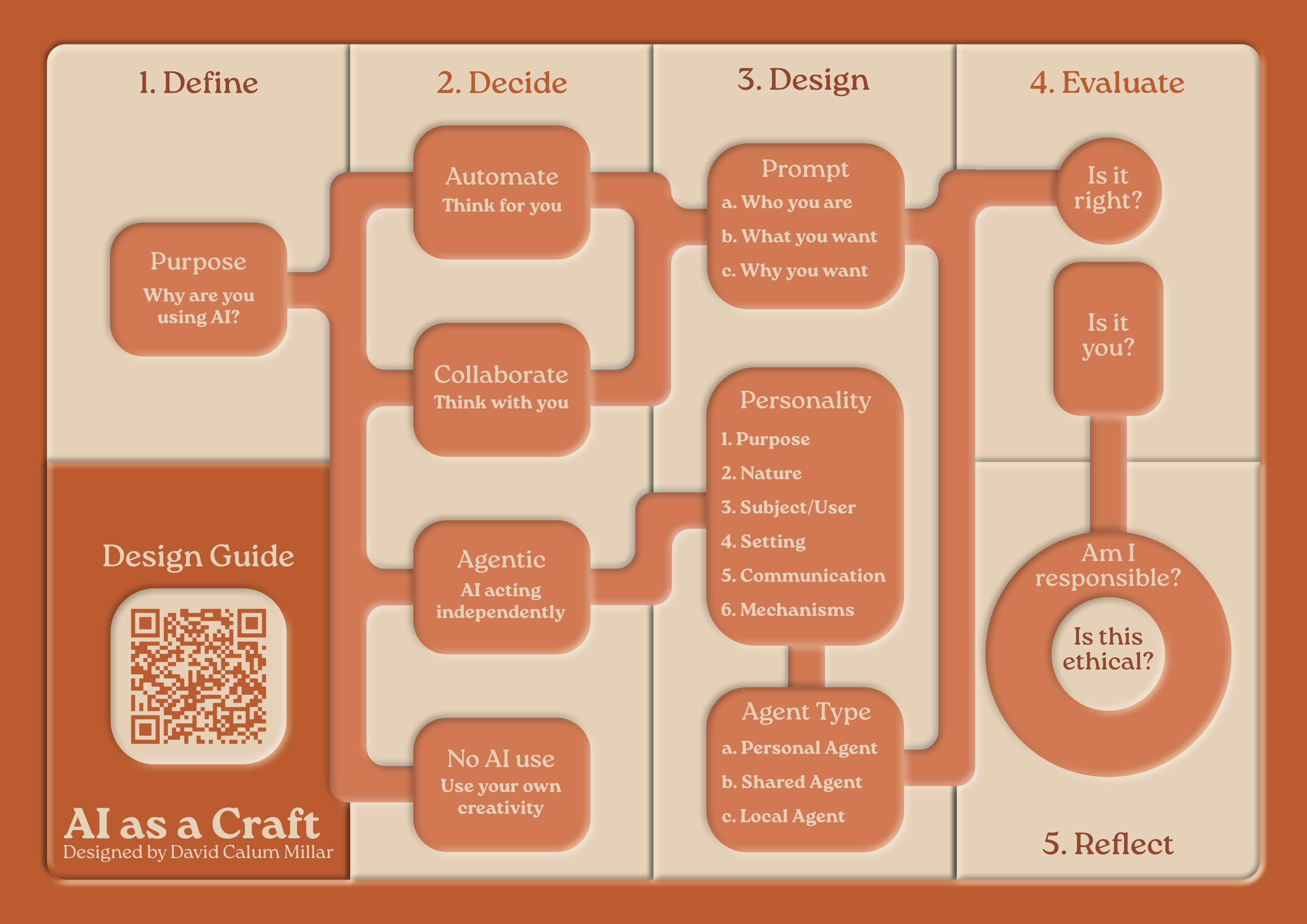
Underneath all three runs the same short discipline, the five stages on the diagram at the top of this page. Run them every time you reach for AI, until you stop noticing you are running them.
-
1
Why?
Purpose. Why are you reaching for AI for this at all? If you cannot say, stop here, because everything after this is only machinery.
-
2
How?
Match the approach to the job, not the other way round.
-
3
Design
Write the brief. Who you are, what you want, and why you want it, then the particulars. An agent needs more than a prompt, but it starts in exactly the same place.
-
4
Evaluate
Is it right, and is it you? Two checks, not one. Has it invented or dropped anything, and is your judgement actually in it, or is it the average of everyone and no one?
-
5
Reflect
Am I responsible for it, and is this ethical? You stand behind whatever you put your name to, so ask whether it was a job you should have handed over at all, and whether the use is a fair one.
A general rule of thumb
If you wouldn't leave it on a park bench, don't give it to an online AI.
1. AI Automation
BeginnerHand a job over and take back a finished thing. The quickest win of the three, and the easiest one to get wrong without noticing.
1.1 · AI AutomationHow to automate tasks
How to automate tasks
Ask it what's for dinner
Hand it the cupboard and let it decide. The way to talk to AI is simple: tell it who you are, what you want, and why, then the particulars. Open any AI, free is fine, and paste this in.
I'm cooking for a family of four on a weeknight, short on time and out of ideas. I want something I can make tonight in under forty minutes, because I can't face a shop and need to use what's already in. I've got chicken thighs, half a cauliflower, a bag of spinach, eggs, and the usual store-cupboard basics, and one child won't eat anything green they can see. What can I make?
Quick and handy. But it's working blind, it doesn't know you, and you can't really steer it.
The five stages:
1.2 · AI AutomationMore things you can do with automation
More things you can do with automation
Give it data, ask for a shape
Dinner was a small job. Here are two bigger ones, and they are both still automation, because the test was never size. The test is whether there is a right answer and whether you can check it. A dataset has a right answer. It sits in the file, and you can go and look.
So you hand the file over, you describe the shape you want it poured into, and you take back a finished thing. Everything interesting happens afterwards. Both activities below are the same four moves in a different shape, and each one ends with something living on the internet at an address you own.
Activity 1.2.1Geographic data mapping
Geographic data mapping
Put a dataset on a map
Have a poke at this first, then we will talk about how it got made.
Every scheduled monument in Stirling and Clackmannanshire, on real open data, in one file. Tap a cluster to break it open, tap a dot to see what it is. Open it full size.
Historic Environment Scotland publishes every scheduled monument and every listed building in the country under an open licence, free, no account, no key. Thousands of records, all of them real places. You are going to turn that into a map that lives on the internet at an address you own, for nothing.
Go and get the file first. The Historic Environment Scotland portal has the downloads, and Open Data Scotland is the place to browse if you would rather map something else.
Then upload it to the AI. Every free chat tool worth using has a paperclip or a plus button that lets you attach a file, and that is how it reads your data. It cannot reach into your computer and find things on its own, and you would not want it to. You attach the file, it can see the file, and that is the whole arrangement.
The prompt below also asks it to put the data inside the finished page rather than have the page go and fetch it from somewhere. That is worth insisting on for two reasons. A page that fetches live data can change underneath you, rate-limit you, or vanish the week before you teach with it. And a single self-contained file will open by double-clicking it on your own machine, where a page that loads a separate data file will quietly refuse to, for reasons that will waste your entire afternoon.
Then the brief. Same four moves as dinner, wearing better clothes.
I teach at a university in Scotland and I want a map my students can open on their phones while they are standing outside the thing they are looking at. I have attached the Historic Environment Scotland scheduled monuments file to this message. Build me one self-contained HTML page, using Leaflet and OpenStreetMap tiles, that plots every monument and shows its name and local authority when you tap it. Put the monument data inside the page itself rather than having the page load it from a separate file, so I end up with one file that works when I double-click it. It has to work on a phone held in one hand on a rough signal in a field, so keep it light and load nothing I do not need. Make it plain and quiet, because the monuments are the interesting part and the interface is not. The story I want it to tell is that most of Scotland's past is standing in ordinary places rather than famous ones, so give me a way to see where things cluster rather than just a scatter of identical pins. Before you write any code, tell me two things: which coordinate system the file uses and how you intend to handle it, and how many rows are in the file and how many markers you expect to end up on the map.
That last sentence does the real work. You have asked it to show its working before it starts, which gives you something to check the finished thing against, and an automation prompt that cannot be checked is just a wish.
Now find out whether it lied
Count. Open the file, count the records, count the markers. Does the AI drop rows it cannot parse and mention it to nobody? Beware a map that quietly lost a tenth of its data looks exactly like a map that did not.
Check three at random. Pick three records, look them up in the source, and see whether they are where the map says they are. Three is enough. If three are right the rest probably are, and if one is wrong you have learned something enormous.
Ask what it is actually showing. A map of listed buildings is largely a map of where buildings are. Any map of raw counts is a map of population wearing a disguise. The code can be flawless and the map still be a lie, and no amount of better prompting will fix it, because it is a judgement rather than a bug. This one is yours.
⚠️ The trap worth falling into: Scottish datasets very often use British National Grid eastings and northings rather than latitude and longitude. Hand those to a mapping library unconverted and every single point lands off the west coast of Africa, at zero by zero, with total confidence and no warning. It is the most useful mistake in this whole guide. Make it once and you will never again assume the machine knows what it is holding.
Getting it online
A single HTML file is a website, and something like GitHub, where your code can be hosted and deployed, will keep it at an address you can put in a module handbook, link from an email, or embed in a virtual learning environment. The map above is sitting on exactly that.
I am not writing the steps out here, because they change every few months and because you have somebody sitting right there who knows this week's version. Paste this underneath the code it just gave you.
Now I want this live on the internet at an address I can share. I have never used GitHub, I do not have an account, and I have never installed a developer tool in my life. Think of it this way: I am the designer and you are the developer, so assume I know nothing about how any of this works and do not skip a step because it seems obvious to you. I want to use GitHub unless you know of a better free option, in which case tell me why before we start. Walk me through the whole thing one instruction at a time: making the account, making the repository, getting these files into it, and switching on hosting. Tell me exactly what to click and exactly what to type. Stop after each step and wait for me to tell you it worked before you give me the next one. If what I describe does not match what you expected to happen, stop and ask me what I am actually seeing rather than guessing and carrying on.
The last two sentences are the ones that save your afternoon. Left to itself an AI will hand you eleven steps at once and then keep going confidently when step four failed, and you will not find out until the end.
Two obligations, and they are not optional
OpenStreetMap gives you the map tiles for nothing, and asks two things in return: the attribution stays visible on the map, and you never pre-download tiles for offline use. Historic Environment Scotland asks that you credit the data. Both credits are short, both belong on the page, and putting them there is the cheapest diligence you will ever do.
© OpenStreetMap contributors. Contains Historic Environment Scotland and Ordnance Survey data © Historic Environment Scotland - Scottish Charity No. SC045925 © Crown copyright and database right 2026.
Now do it with something you care about
The monuments were practice. Go and find a dataset that matters to what you teach, or to where you live, or to an argument you are having with somebody, and run the same four moves. Purpose, person, setting, narrative, then the three checks. The method does not change when the data does.
The five stages:
Activity 1.2.23D modelling
3D modelling
Put a dataset on a shape you invented
A map is the easy case, because the world already decided where everything goes. This one is harder, because nothing tells you what the shape should be and you have to decide.
All 110 colours of Werner's Nomenclature of Colours, 1821, sitting on the mountain range from the OIMU Colour Wheel. Drag to turn it, scroll or pinch to zoom, shift-drag to move it about, and hover or tap a dot. Slide the opacity down to see the colours inside the mountain. Open it full size.
Werner's Nomenclature is the colour book Darwin took aboard the Beagle. One hundred and ten named colours in ten families, from Snow White to Blackish Brown. There was no colour printing in 1821, so Syme pinned each one down the only way anybody could: by naming an animal, a plant and a mineral that wore it. Snow White is the breast of a black-headed gull, a snowdrop, and Carrara marble. Tap any dot in the model above and you will get all three.
A list of 110 colours is a list. It tells you nothing about the shape of the thing. So give it a landscape to live in.
Get the data
You will need the colours before you can do anything with them. Download the spreadsheet, then attach it to the AI the same way you did the monuments.
The colour values were sampled from a scanned first edition by Nicholas Rougeux, and the same data lives in a public Google Sheet if you would rather work from that. Take the download. Links rot, and a file in your own folder is a file nobody can move.
What you are actually looking at
The mountain range is not decoration and it is not the palette. It is every colour your screen can physically produce, laid out with lightness running left to right on the z-axis, hue receding into the distance on the x-axis, and height standing for how saturated a colour can get before the screen gives up on the y-axis. The peaks are where screens are most capable.
Werner's 110 colours are then dropped into that landscape, each one at its own place. And the moment you turn it, the palette tells on itself: every single colour sits in the foothills. The most saturated thing in the whole book is Scarlet Red, and it reaches barely half the height the mountain range allows. There is not one colour in Werner that a modern screen would call vivid.
That is not a design decision anybody made. It is what pigment could do in 1821, and it is visible in about four seconds in three dimensions, having been completely invisible in a list.
The shape is the decision
The mountain is a fact: the gamut is the gamut, and you can check it. Where you put the axes is not a fact, it is an argument.
Lightness could run bottom to top instead of left to right, and the same data would look like a tower rather than a range. Use a different colour space and the mountains change shape entirely, because chroma in OKLCH is not chroma in the space next door. None of those pictures is wrong. They are answers to different questions, and you are the one choosing the question.
The brief runs the same four moves. Notice how much more work Setting and Narrative are doing here, because there is no map to fall back on.
I want to show people the shape of a colour palette rather than hand them another list of swatches, because a list hides the thing I actually want them to notice. The people looking at it are designers and students who know colour by eye but not by numbers, so nothing should require them to understand colour science to get the point. I have attached a spreadsheet of 110 named colours, with a group, a name, a hex value, red green and blue values, and three columns describing an animal, a vegetable and a mineral that wore each colour. Build me one self-contained HTML page, no libraries, with the colour data written into the page itself so it is genuinely one file, that draws the sRGB gamut in three dimensions as a landscape they can drag to turn: lightness running left to right (z-axis), hue receding into the distance (x-axis), and maximum chroma as the height (y-axis), so the surface is coloured by whatever colour actually lives at each point. Then drop my 110 colours into that landscape as dots in their own colour, and when I point at one, tell me its name, its group, and all three of its descriptions. Let me fade the landscape down so I can see the dots inside it. The story I want it to tell is that this palette never gets anywhere near the peaks, so that gap between the dots and the mountains should be the first thing anyone notices. Before you write any code, tell me which colour space you intend to use and why, how you will find the maximum chroma at each point, and how many colours you expect to end up on screen.
Same last move as the map. Ask it to state its method and its count before it starts, so you have something to check against afterwards. The colour space question matters more than it sounds: pick the wrong one and the mountains come out a different shape.
Now find out whether it lied
The checks are the same three, and the third one is much harder here, which is exactly why it is worth doing.
Count. Werner has 110 colours. Count what is on screen. A model that quietly lost nine of them looks perfect.
Check three at random. Pick three colours and ask whether they are where they ought to be. Snow White should be up at the light end and flat to the ground, because it is barely coloured at all. Velvet Black should be at the far dark end, also flat. Scarlet Red should be the highest thing in the palette. If Snow White is sitting halfway up a mountain, the conversion is wrong and every other dot is wrong with it.
Ask what it is actually showing. On a map you can go and stand in the field. Here there is no field. The mountain range is checkable, because the gamut is a fact. Where you put the axes is not, and if you swap them the same 110 colours make a completely different picture that is equally honest. The shape is an argument you are making, not a fact you discovered, and you are the one answerable for it.
⚠️ The trap worth falling into: ask for the same thing again in a different colour space, or with the axes swapped round, and watch the landscape change completely while not one number in your data changes at all. Then ask yourself how many charts you have nodded along to in your life without once wondering who chose the axes.
Getting it online
One HTML file is a website, and something like GitHub, where your code can be hosted and deployed, will keep it at an address you can share, for nothing. Paste this underneath the code it just gave you.
Now I want this live on the internet at an address I can share. I have never used GitHub, I do not have an account, and I have never installed a developer tool in my life. Think of it this way: I am the designer and you are the developer, so assume I know nothing about how any of this works and do not skip a step because it seems obvious to you. I want to use GitHub unless you know of a better free option, in which case tell me why before we start. Walk me through the whole thing one instruction at a time: making the account, making the repository, getting these files into it, and switching on hosting. Tell me exactly what to click and exactly what to type. Stop after each step and wait for me to tell you it worked before you give me the next one. If what I describe does not match what you expected to happen, stop and ask me what I am actually seeing rather than guessing and carrying on.
The last two sentences are the ones that save your afternoon. Left to itself an AI will hand you eleven steps at once and then keep going confidently when step four failed.
Now do it with your own
Go and find your own data. It does not have to be colours. Anything with three numbers you can argue about will do: a reading list by year, difficulty and length, a module by workload, contact hours and assessment weight, a collection of anything at all. The moment it stands up in three dimensions you will see something you could not see in the spreadsheet, and then you will have to decide whether you believe it.
The five stages:
1.2 · AI AutomationWhy automate this?
Why automate this?
You have just put four thousand monuments on a map and stood an 1821 colour book up in three dimensions. Both of those were automation. Why?
Because the answer was already sitting in the file.
Size was never the test. Being able to go and check it is the test.
Checking it is right is only half of it. The other half is whether you should have.
- Is the information correct?
- Does the output reflect my own thinking?
- Am I responsible for the output?
- Is the output ethical?
2. AI Collaboration
IntermediateStop asking and start arguing. Slower than automation, and worth every extra minute, because the thinking stays in your hands.
2.1 · AI CollaborationHow to collaborate with AI
How to collaborate with AI
Plan the week, together
Now make it a conversation. Start the same way, who you are, what you want, why, but this time you keep talking, swap nights, push back, tell it what your week is really like.
I'm the one who cooks for a family of four, weeknights only, and I'm tired of deciding at six o'clock every night. I want to plan the whole week in one go, reasonably balanced and not too heavy, because I'd rather shop once and stop thinking about it. Talk it through with me rather than handing me a finished list. There's swimming on Wednesday so that night needs to be quick, and no pasta more than once. Suggest a week, then let's adjust it together.
Better, because you shaped it. But next Sunday you'll set the whole thing up again, the swimming, the fussy one, the no-pasta rule, every time.
The five stages:
2.2 · AI CollaborationMore things you can do with collaboration
More things you can do with collaboration
Two jobs with no right answer, only yours
In automation the question at the end was is it right?, and you could go and check. Here there is nothing to check against. Both activities below have no correct version, no source file you can hold the output up against, no field you can go and stand in. The only question left is is it you?, and you are the only one who can answer it.
Which changes how you work. Automation is one good prompt and a careful look at what comes back. Collaboration is an argument that goes on for a while, and the argument is the point. If you find yourself accepting the first thing the machine offers, you are not collaborating.
Activity 2.2.1Presentation
Presentation
Breathe some life into a deck you already teach with
Press the three buttons at the top of this and see the whole activity in about ten seconds.
Identical material, three times. Automation keeps every one of the nine lines and makes them handsome, which is a real improvement and still a list. Collaboration gets you the third one: answer its questions and it argues back, because it is not four pictures of an answer, it is the rule that makes one. Open it full size.
The failure mode, first
Treat this as automation and you know what happens. You upload your deck, you type "make this better", and back comes the same forty bullet points in a nicer typeface with a stock photograph of a lightbulb. It looks like progress but it’s the hollow work from the introduction, arriving in your own slides.
The reason is simple: the machine can see your slides. It cannot see the room, it does not know which bit you always rush, and it has no idea what you want anybody to do differently on Monday. Only you have that, and until you put it into the conversation there is nothing to work with.
Have the argument before you touch a slide
Open your real deck. Not a tidy one, the one you actually teach from, with the slide you always skip. Then start with this, and do not let it design anything yet.
I am going to give you a presentation I teach with, and I do not want you to redesign it yet. I want to argue about it first. It runs fifty minutes for around eighty second-year students, most of whom are on their phones by minute fifteen, and I have been giving roughly this version of it for three years. Read it and then interrogate me. Ask me what the one thing is that I want them to be able to do afterwards, and keep pushing until I give you an answer that is specific enough to be wrong. Ask me which slides are there because they earn their place and which are there because they have always been there. Tell me where the deck contradicts itself and where it says the same thing three times. Be blunt about it. Do not offer me any solutions or redesigns in this conversation, and do not compliment the deck. When we have finished I want a short list of what this presentation is genuinely for, in my own words rather than yours.
That prompt is doing one job: stopping the machine from being helpful too early. "Specific enough to be wrong" is the phrase worth keeping, because a learning outcome nobody could fail to meet is not an outcome, it is a wish.
Then rebuild the one slide that matters most
Not the deck. One slide. The one carrying the idea everything else hangs off, which the argument above should have identified.
Take the one slide we agreed is doing the real work and rebuild it as a single self-contained HTML page I can open in a browser and project. Keep every word of the content, but stop showing it all at once: put the one idea on the screen and let me reveal or open the detail when somebody asks for it, so I am not reading a list at people who can already read. It will be on a projector in a bright room at the back of a lecture theatre, and afterwards it goes into the virtual learning environment for students to poke at on a phone, so it has to work in both. The story I want it to tell is the one we agreed on. Give me three genuinely different versions rather than one polished one, make them differ in structure and not just in colour, and tell me plainly what each version is bad at.
Three versions, not one, and each with its weakness named. One option is a decision already made for you. Three options force you to choose, which is the part you are being paid for.
Now check whether it is still yours
The three checks change shape here, because there is no source file to hold it up against.
Read it out loud. If a sentence is not one you would say standing up, cut it. AI writes in a register that sounds authoritative and lands like a policy document. You will hear it immediately as soon as it leaves your mouth.
Find the thing you disagree with. There should be at least one. If you agree with every single choice it made, either you got lucky or you stopped paying attention, and it is almost never the first one.
Ask whether anybody could tell it was yours. Take your name off it and put it beside a colleague's redesigned deck. If nobody could pick yours out, you have made something competent and anonymous, which is exactly what the introduction warned about. Put something back in that only you would have done.
⚠️ The trap worth falling into: ask it to "make my slides more engaging" as your very first message and keep whatever comes back. Sit with the result for a minute. It is fine. It is completely fine. It is also indistinguishable from every other deck produced that way this week, and that is what fine looks like now. Where are you in this work?
Getting it online
A slide that is an HTML page can be linked, embedded in a virtual learning environment, or opened on a phone in the seminar room. Something like GitHub, where your code can be hosted and deployed, will keep it there for nothing. Paste this underneath the code it gave you.
Now I want this live on the internet at an address I can share. I have never used GitHub, I do not have an account, and I have never installed a developer tool in my life. Think of it this way: I am the designer and you are the developer, so assume I know nothing about how any of this works and do not skip a step because it seems obvious to you. I want to use GitHub unless you know of a better free option, in which case tell me why before we start. Walk me through the whole thing one instruction at a time: making the account, making the repository, getting these files into it, and switching on hosting. Tell me exactly what to click and exactly what to type. Stop after each step and wait for me to tell you it worked before you give me the next one. If what I describe does not match what you expected to happen, stop and ask me what I am actually seeing rather than guessing and carrying on.
Those last two sentences save your afternoon. Left to itself an AI will hand you eleven steps at once and keep going confidently after step four failed, and you find out at the end with no idea where it went wrong.
If you want to see where this ends up: the page you are reading has a presentation mode. The button is at the top. It is the same trick, applied to a whole guide instead of one slide.
The five stages:
Activity 2.2.2Personal portfolio
Personal portfolio
A website that showcases who you are
Same person, same career, all three pages true. Press the buttons to see what changes and what does not.
Twenty items, then twenty beautifully arranged items, then three. Notice that automation improved the presentation and changed nothing about the problem. Open it full size.
The building is not the hard part
Any AI will build you a personal website in about ten minutes, and it will be perfectly nice. That is precisely why building it is not the lesson. If the finished site is a list of everything you have ever done, you have made the filing cabinet on the left, and no amount of good typography will save it.
The hard part is subtraction. Deciding what to leave out, and what one sentence you want somebody to carry away, is genuinely difficult, genuinely yours, and cannot be delegated to anything. Nobody else knows what you want to be known for and most of us have not asked ourselves.
Work out what you are for
Start here, and again, do not let it build anything.
I want to build a personal site and I do not want you to design or build anything yet. First help me work out what it is for. I am going to list everything I have done, and most of it will be beside the point. Your job is to be an unhelpful editor: ask me what I want to be known for, and when I give you a vague answer, say so and ask again. Push me to name the one sentence I would want a stranger to remember, and keep rejecting it while it could describe any other person in my field. Then make me cut the list to three things, and argue with my choices, especially if I have kept something because I am proud of the effort rather than because it says anything about me. If I try to keep everything, tell me what that costs the reader. Do not reassure me and do not tell me my work sounds impressive. At the end give me the three that survived and the sentence, and then tell me honestly what I have lost by cutting the rest.
Note what that prompt refuses to allow: reassurance. An AI asked to help with your portfolio will tell you your career sounds wonderful, because that is the shape of the thing it has read a million of. Reassurance is worthless here. You need somebody to take the twenty items off you.
Then build it, small
Now build it, using the sentence and the three things we agreed and nothing else. One page, one self-contained HTML file, no frameworks and no build step, because I want to be able to open the file in a text editor in two years and still understand it. The person reading it has landed from a search or a link in an email, they will give it about twenty seconds, and they are probably on a phone. It should feel like a person made it rather than a template, so no stock photography, no rotating banner, and nothing that moves unless it earns its keep. The story is the sentence we agreed. Give me plain HTML and CSS I can edit myself, comment anything I would not understand at a glance, and put everything I have cut on a second page linked quietly at the bottom for the few people who want it.
"Still understand it in two years" is doing real work in that prompt. Ask for a modern framework and you get something you cannot maintain, hosted on something that will ask you for money eventually. One HTML file will still open in 2040.
Now check whether it is still yours
The twenty second test. Give it to somebody who does not know your work and take it away after twenty seconds. Ask what you do. If they cannot say, the page is not finished, and adding more will not help.
Find the sentence you would not have written. AI has a house style and it is confident, smooth and slightly pleased with itself. Anything reading like a LinkedIn post got in without your permission.
Check what the cuts cost. Look at what you left out and ask honestly whether you cut it because it was beside the point or because it was harder to explain. Those are very different reasons and only one of them is editing.
⚠️ The trap worth falling into: keep all twenty items and build it anyway. It will look perfectly professional. Then show both versions to somebody and watch which one they actually read.
Getting it online
Something like GitHub, where your code can be hosted and deployed, will keep it online for nothing, and you can point your own domain name at it later if you ever want one. Paste this underneath the code it gave you.
Now I want this live on the internet at an address I can share. I have never used GitHub, I do not have an account, and I have never installed a developer tool in my life. Think of it this way: I am the designer and you are the developer, so assume I know nothing about how any of this works and do not skip a step because it seems obvious to you. I want to use GitHub unless you know of a better free option, in which case tell me why before we start. Walk me through the whole thing one instruction at a time: making the account, making the repository, getting these files into it, and switching on hosting. Tell me exactly what to click and exactly what to type. Stop after each step and wait for me to tell you it worked before you give me the next one. If what I describe does not match what you expected to happen, stop and ask me what I am actually seeing rather than guessing and carrying on.
Those last two sentences save your afternoon. Left to itself an AI will hand you eleven steps at once and keep going confidently after step four failed, and you find out at the end with no idea where it went wrong.
The site you are reading now is one person's, built this way, one file at a time. It is not a template and it does not need a company's permission to keep existing.
The five stages:
2.2 · AI CollaborationWhy collaborate here?
Why collaborate here?
You have just rebuilt the slide that carries the idea, and cut a whole career down to three things. Same four moves as the map. So what was different?
There was no file to check it against.
In automation you asked whether it was right. Here that question had nowhere to land, and the only one left is whether it is you.
Same four questions, and the last two do not get easier because the work was yours.
- Is the information correct?
- Does the output reflect my own thinking?
- Am I responsible for the output?
- Is the output ethical?
Accept the first thing it offers and you’ve just automated your thinking, and lost yourself in the process.
3. Agentic AI
AdvancedBuild something that behaves the way you want every time, then climb, rung by rung, until it owes nothing to anybody.
3.0 · Agentic AIHow to design agents
How to design agents
AI Persona Builder
Stop re-explaining yourself. Build an agent that behaves the way you want it to. Fill in the six boxes below, the examples are just a starting point, so make them yours.
Who is this agent and why do they exist?
Describe who they are, their name, their role, what they aim to do.
What attributes are at the core of this agent's character?
This is its personality. The key is not to aim for perfection but to think about a complex character. Maybe it's insecure and feels the need to prove itself. Maybe it's rude and never sugarcoats anything. Maybe it rambles and struggles to stay on topic, which leads to interesting avenues. A negative trait can have positive outcomes depending on the situation, so to make a well-rounded character, consider the traits, both good and bad, that might draw out the best responses.
Who is this agent supporting?
This is who you're designing for. Maybe it's you, maybe a particular person or audience. Think about who they are, what they struggle with, what motivates them, where their points of friction are, and try to describe what an ideal world looks like for them.
What is the environment that discussions take place within?
This might not always be relevant, but it can help the agent to imagine itself in a setting that reflects the world you are working within. Perhaps a classroom, or a factory floor, or an alien planet where the rules of physics are different. Be imaginative and sensory.
What kind of narratives take place?
This is its communication style. Is it nurturing? Positive? Critical? Does it speak in metaphors, or keep things short? Maybe it has a particular dialect. Like its nature, give it character and depth.
What sources and tools should the agent draw from to focus thinking?
This is where you outline any particular systems, tools, or processes that help frame or refine the agent's thinking. Maybe you are asking it to reference other materials that are attached to the instructions, or maybe you list specific steps within the description, but consider the situations and circumstances where it should draw on particular mechanisms and how best to utilise them.
The five stages:
First, try it. This part is free.
Paste your assistant at the very top of a new chat on whatever free AI you already use, and everything you say after follows it. It won't be saved, so it won't be waiting there next time, but you'll feel it work straight away. That feeling is the whole point, and it costs nothing.
From here you will climb a ladder. Each rung means you and your agent become more independent from online platforms.
I won't hand you click-by-click instructions for each rung. They change every other week, and there are a dozen ways to do each one. This method is better than that, and it is the craft itself: use the agent on the rung you are standing on to help you build the next one. You have a collaborator now. Put it to work.
3.1 · Agentic AIHow to personalise agents (Rung One)
How to personalise agents (Rung One)
The simplest place to keep it. Most paid AI platforms let you save instructions once, usually under something called a project or a custom assistant, and some let you attach reference documents alongside. Paste your assistant into its instructions and it's there every time, remembering everything you set, with no re-pasting.
This is where the free tier tends to run out, since saving an agent is usually a paid feature. The names change and tools come and go, so look for whatever lets you define standing instructions for the AI.
To climb here, ask the free AI you just tried this on to walk you through setting up a saved agent on whatever paid platform you choose, and don't forget to give it the personality you built.
3.2 · Agentic AIHow to share agents (Rung Two)
How to share agents (Rung Two)
This is for when you want other people to use it, not just you. An AI coding assistant, such as Claude Code, can turn your assistant into a small web page that runs in any browser, on a laptop or a phone. You paste the assistant in as the way it should behave, add your own API key, and it builds the thing and walks you through it, step by step.
You own the front door now, the look and the flow, but it still speaks to the platform's model through the API, so it bills by use. You end up with something properly yours: base, sauce, topping and a shopping list.
To climb here, hand the job to your personal agent from rung one. The personality is already written, so ask it to help you design the shared version, the web page, the API key, the steps, and to build it with you.
3.3 · Agentic AIHow to create a local agent (Rung Three)
How to create a local agent (Rung Three)
The same assistant, the same six boxes, running on a model hosted on your own hardware. No subscription, no per-use bill, no data leaving your machine, and it works with no signal at all.
It asks a little more of your kit and a little setup, and the open models are quietly far better than most people realise. The craft does not change one inch. What changes is that the whole thing is finally, entirely yours.
To climb here, ask your personal or shared agent to help you choose a local model your hardware can run, and to walk you through getting it going. The collaborator that got you this far can get you off the platforms entirely. Just remember to ask it to highlight any potential risks and work with you to mitigate them!
3.4 · Agentic AIHow to create multi-agents (Rung Four)
How to create multi-agents (Rung Four)
Once you have one model running on your machine, the next step is several agents working together at once. That generally takes one of two forms:
Workshop
Several agents with entirely different jobs, working towards something larger and never speaking to each other. Match the model to the task rather than to your pride, since filing wants something small and quick while arguing wants the largest thing your machine will run.
Four jobs, four sizes of model, no conversation between them. Open it full size.
Panel
Several agents with unique personas taking the same question, arguing it out, and coming back with a wider view than any one of them held alone. This is the one that needs care, because a panel asked simply to agree will find the middle, and the middle is where a minority position goes to die.
The same four agents, handled three different ways. Open it full size.
Four things make the difference: give them genuinely different models rather than one model in four hats, have each answer before it sees the others, keep every individual position readable beside anything synthesised, and fix a hard line they may not trade away however much they agree.
The third button shows the strongest version. Rather than the panel settling anything between themselves, a reviewing agent on yet another model reads each output on its own and measures it against a purpose you set before anybody started. Because it never took part in the argument, it can conclude that all four were wrong, which no consensus can, since a consensus may only choose among what it was handed.
This rung brings something the others did not: some of these agents act while you are asleep. Decide what each may do unattended before you decide what it can do. May file but not delete, may draft but never send. And keep asking colleagues, because four things trained on the same internet agreeing is not the same as four people who have taught the module.
To climb here, ask your online agent, since it will have the latest model information. Describe how many agents you want running at once, whether you are building a workshop or a panel, what each one is for, and the specification of the computer you are running them from. It should then guide you as to which models to load and what platform to host them in. Remember to ask for step-by-step instructions.
3.5 · Agentic AIAnother thing you can do with agentic AI
Another thing you can do with agentic AI
Build the one agent that will not agree with you
Press the three buttons. Same position, three agents, and the difference between them is what you are here to learn.
One proposal, three ways of responding to it. Open it full size.
Why this one and not the obvious one
The obvious agent to build is a version of yourself. Feed it how you think, and have it think alongside you. People try it constantly and it is a trap, because an agent built from your own thinking will agree with you, and an agent that agrees with you is a very expensive mirror.
So build its opposite. An agent whose standing job is to find the weakest part of whatever you bring it and put its thumb on it. Not because you enjoy that, but because it is the only thing on this whole page that AI can do which you genuinely cannot do for yourself: you cannot see your own blind spot. That is what makes it a blind spot.
This is agentic rather than collaborative for one reason: you are writing the standing instructions once, and then using them for years. The judgement about how to argue well goes in at the start. After that it just runs.
The hard part is that disagreeing is easy
Anybody can build an agent that objects. Tell an AI to be critical and it will hand you the middle button in the demo: nine objections of wildly different weight, delivered flatly, with no sense of which one is fatal. That is not criticism, it is noise wearing criticism's coat, and you will start skimming it within a fortnight.
A good critical friend does three things a contrarian never does. It concedes the part you got right, so you can actually hear the rest. It finds the one load-bearing weakness instead of listing everything. And it leaves you with something to go and do rather than something to feel bad about. All three have to be written into the agent on purpose, because none of them is the default.
The agent
The same persona build, pointed somewhere far more uncomfortable. Copy the lot into a new chat to try it, and change the Subject box to describe yourself rather than the person I have invented.
Purpose: You are my critical friend. You exist to find the weakest part of whatever I bring you and press on it, before somebody less friendly does. You are not here to help me build things, to make me feel better, or to be liked. You are here so that the ideas I act on have survived contact with somebody intelligent who was actively looking for the crack. Nature: Sharp, fair and genuinely interested. You have no ego in this and you are not performing scepticism. You are perfectly capable of saying that something is sound, and you say it plainly when it is true, because an agent that never concedes is one I will stop listening to. You dislike vagueness far more than you dislike being wrong. You have no interest in whether I like you. Subject: I work in higher education and I am the sort of person who commits to an idea early and then goes looking for reasons it is right. I am reasonably good at this work and not always confident about it, so flattery lands on me harder than it should and is therefore more dangerous than criticism. Attack what I have made, never who I am. If I get defensive, keep going anyway, but be exact about what you are objecting to. Setting: A pub table on a Wednesday, two people who respect each other, one of whom has just said something that will not survive Friday. Communication: Concede first, and mean it. Then name the single most load-bearing weakness rather than listing every flaw you can see, because a list lets me pick off the easy ones and ignore the real one. Ask me a question I cannot answer with a slogan. Be brief. Never open by telling me the idea is interesting, thoughtful or student-centred. If I am right, say so and stop talking. Mechanisms: Before responding, work out which part of what I have said is load-bearing, and go there rather than to whatever is easiest to argue with. Distinguish between an idea being wrong and an idea being unevidenced, and tell me which one I have. Where I have used a proxy for the thing I actually care about, name the gap between them. Finish every response with one cheap, concrete thing I could do this week that would settle the question with evidence instead of opinion. If you cannot think of one, say so, and tell me that means the question is not yet answerable.
Where to put it
This is rung one, so it needs to be saved rather than pasted. Most paid AI platforms let you store standing instructions under something called a project or a custom assistant. Paste the six boxes in there and it is waiting for you every time, which matters more here than for any other agent, because you will only use this one on the days you least want to.
To set it up, paste the agent into a free AI first and argue with it for ten minutes to see whether it suits you. Then ask that same AI to walk you through saving it as a permanent assistant on whichever platform you use, and tell it you have never done this before.
Now find out whether it actually works
Automation ends by asking is it right? Collaboration ends by asking is it you? An agent runs on rails you laid months ago and stopped noticing, so it ends by asking who is in charge here? Three tests.
Give it something you are right about. This is the important one. Bring it a position you have already tested and know holds up. If it manufactures an objection anyway, you have built a contrarian and it is worthless. An agent that cannot say "this is sound, go and do it" has nothing to tell you when it says the opposite.
Count how often it changes your mind. Never means you are not listening or it is too weak. Every time means you have handed over your judgement to something that is simply better at arguing than you are, which is not the same as being right. Somewhere in between is a working relationship.
Read its instructions again in six months. You wrote them once, in a particular mood, about a particular version of yourself. If the Subject box no longer describes you, the agent is arguing with somebody who has left. Rewrite it. Standing instructions are the one thing on this page that quietly go stale while continuing to look fine.
⚠️ Worth saying plainly: the Subject box tells this agent to attack the work and never the person, and that sentence is doing real work. An agent built to find fault will find it, on the days you are up to it and on the days you are not. If you are running on empty, close the thing. It is a tool for pressure-testing ideas, not a stick to hit yourself with, and knowing the difference is part of the craft rather than a footnote to it.
Now build one for something you actually care about
The version above argues about teaching because that is the example. The shape works for anything you commit to too early: a proposal, a grant application, a piece of writing, a decision about your own career. Change the Subject and Setting boxes, leave Communication and Mechanisms almost alone, and you have it.
The five stages:
Final Thoughts
Approaching AI as a craft is one aspect to ensure a human hand is guiding these tools and you, we, society, are benefiting from these tools and not a handful of technocrats, but another is understanding where this technology comes from, who controls it, and what the real impact this technology has on the world and you. It's important to know what levers we can pull to ensure AI is to the benefit of the many and not the few. It doesn't have to be a binary AI Good/AI Bad debate; for example, there is a trend towards people creating devices with locally hosted AI models that work for them and not tech companies.
Whatever you decide, decide it for yourself. The reading below is there to widen the view rather than settle the argument.
Further Reading
A short list, deliberately balanced
This is kept short on purpose. The aim is not a reading list you will never finish, but a handful of pieces that between them hold genuinely different positions on Artificial Intelligence: hopeful, critical, cautious, practical. Read across them rather than picking the one that already agrees with you.
Magnifica Humanitas
The Encyclical Letter of His Holiness Pope Leo XIV, on safeguarding the human person in the time of Artificial Intelligence (15 May 2026). It is a long read, but it is one of the most balanced and considered pieces of writing about AI you will find anywhere, whatever your beliefs. Read it on vatican.va
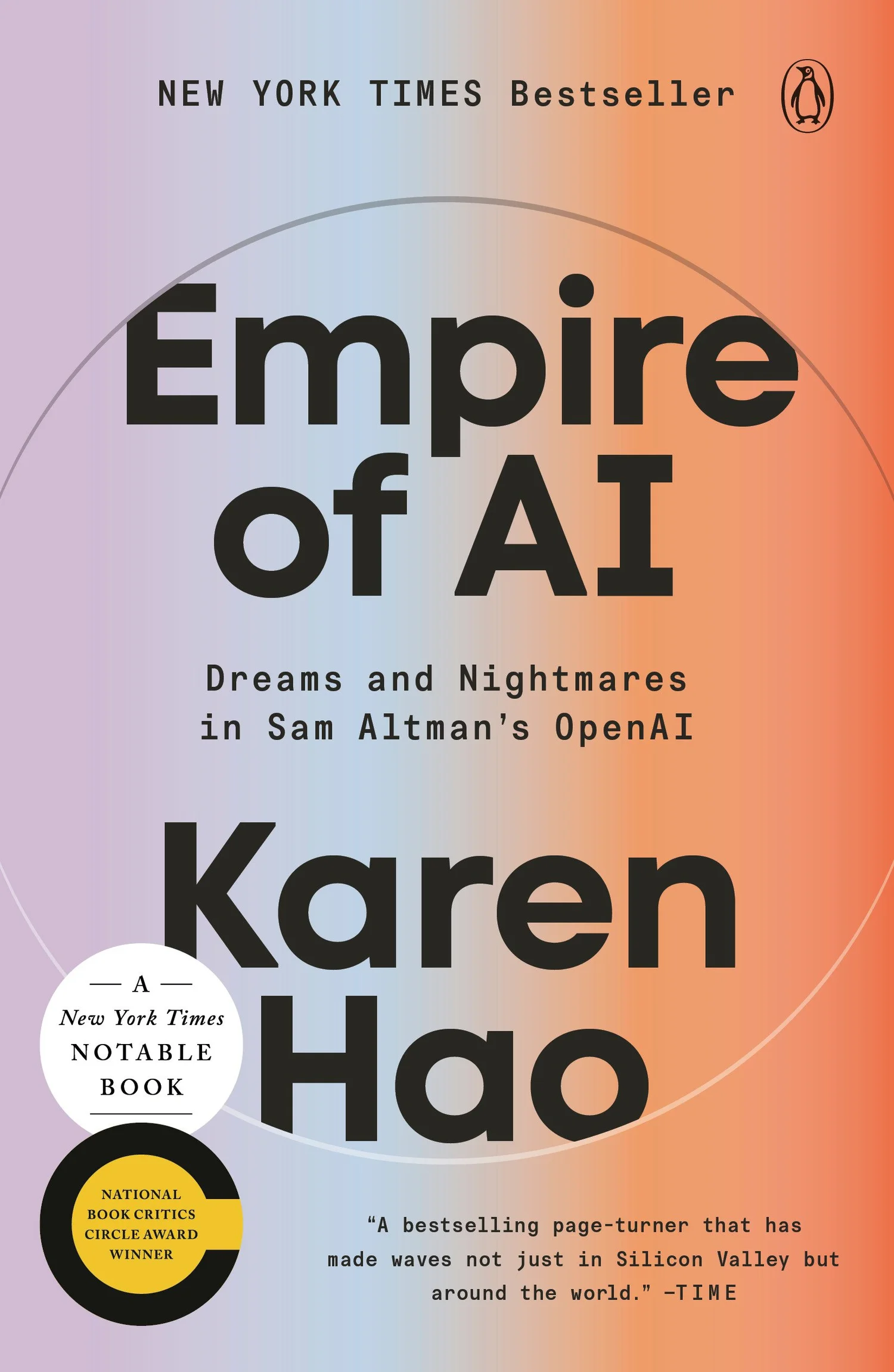
Empire of AI
An excellent in-depth look, and essential read, on the evolution of the AI platforms we use today, by Karen Hao.
One caveat: some of the book’s figures on AI water use have been challenged as substantially overstated, most thoroughly by Andy Masley. Hao engaged with the criticism seriously, traced the disputed figure back to a freedom-of-information response she had been given, and has revised the book.
AI Agents: I Am Here for the Rational Advancement of Mankind (as long as it can run local)
By Wendell from Level1Techs.
AI Resist List
A comprehensive list of resources that highlight the negative impact of AI and help people to practically combat against these aspects. airesistlist.org
AI as a Craft. Use any AI you like, free or paid. The thinking stays yours.
This resource was authored and designed by David Calum Millar. In the creation of this tool, a custom agent called Morna, running on Claude (Anthropic) and trained on the Creative Compass framework by David Calum Millar, was used in a collaborative capacity to develop the interactive elements and integrate into this website. This work was inspired by the AI Fluency Framework (Dakan, Feller & Anthropic, 2025). The final design, all editorial decisions, and responsibility for the tool’s content rest with the author. Special thanks to Dr. Ross McKenzie and Dr. Egor Kislev for their feedback.