AI Fluency Teaching Guide
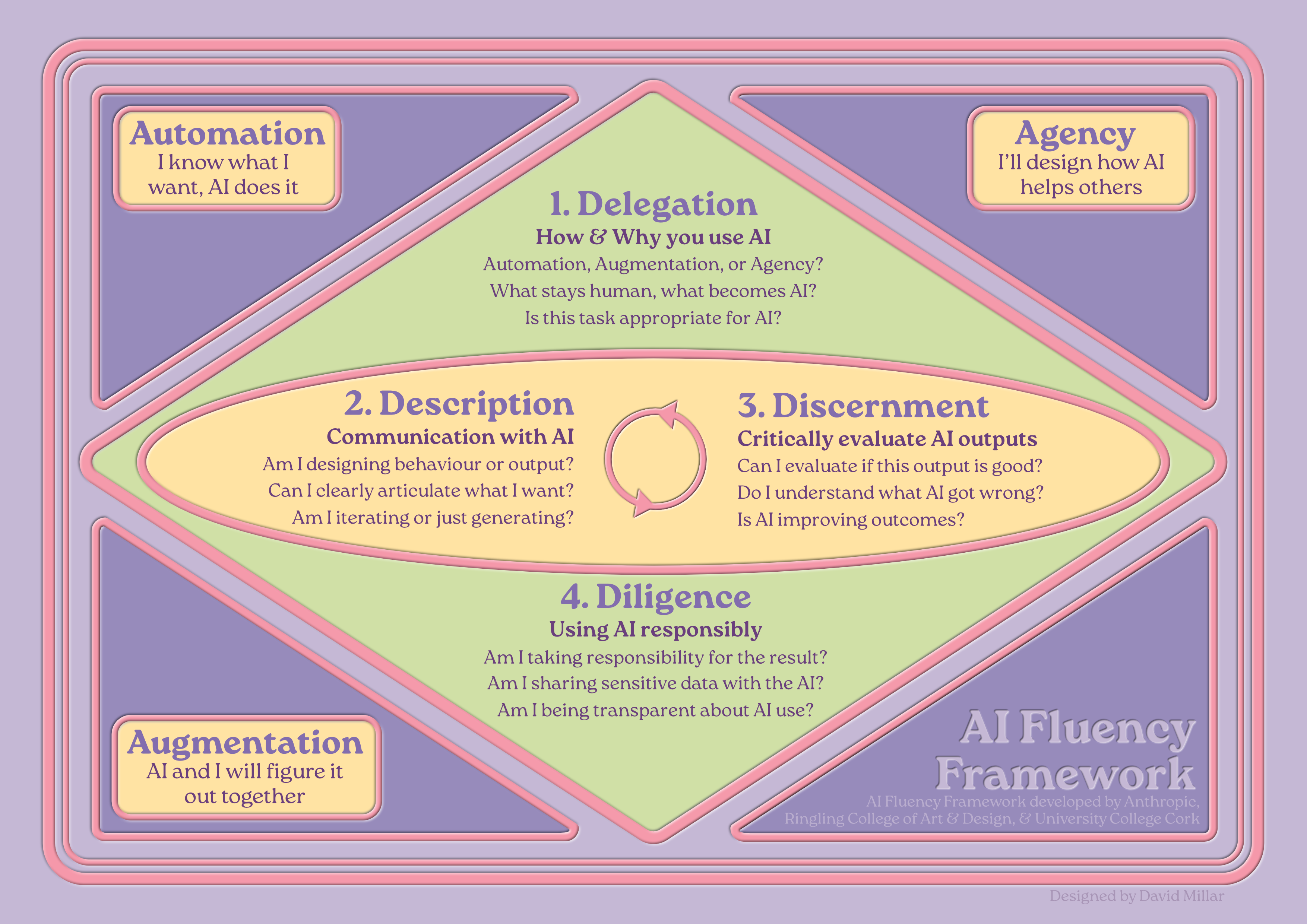
Understanding AI Fluency
AI Fluency is the ability to work effectively, efficiently, ethically, and safely with AI systems. It's not about mastering specific tools or learning clever prompts – it's about developing the capacity to make good decisions about when and how to use AI in your teaching.
The Three Modalities: How You Work with AI
There are three distinct ways to work with AI, each appropriate for different teaching tasks:
AUTOMATION – "I know what I want, AI does it"
You clearly define a task, AI executes it, you evaluate the result.
When to use: Routine, repeatable tasks where you can clearly specify what "good" looks like.
Teaching examples: Generating quiz questions at different difficulty levels, creating multiple versions of explanations, summarising lengthy readings, producing practice exercises.
AUGMENTATION – "AI and I will figure it out together"
You and AI collaborate iteratively, co-creating through dialogue and building on each other's contributions.
When to use: Complex work requiring nuanced judgement where the process itself generates insight.
Teaching examples: Developing case studies that challenge assumptions, refining explanations until they genuinely illuminate concepts, creating scaffolded activities, designing discussion prompts that bridge theory to practice.
AGENCY – "I'll design how AI helps others"
You configure AI to act independently on your behalf, including interacting with students or other systems.
When to use: Creating tools that support teaching or learning without requiring your constant involvement.
Teaching examples: Course FAQ chatbots answering common questions 24/7, adaptive practice systems, virtual teaching assistants, interactive simulations.
AI MITIGATION – Not using AI
You deliberately exclude AI because the teaching moment requires authentic human presence, spontaneity, or relationship-building.
When to use: Moments requiring genuine human connection, professional judgement, or authentic expertise.
Teaching examples: Facilitated discussions requiring real-time reading of the room, one-to-one pastoral support, sharing personal professional experience, responding to unexpected teaching moments.
The Four Competencies: Making Good Decisions About AI
These four interconnected competencies help you work fluently across all three modalities:
DELEGATION – How & Why you use AI
The strategic decisions about whether, when, and how to use AI.
- Is this task appropriate for AI?
- What stays human, what becomes AI?
- Automation, Augmentation, or Agency?
DESCRIPTION – Communication with AI
How you articulate what you need and build shared understanding with AI.
- Can I clearly articulate what I want?
- Am I iterating or just generating?
- Am I designing behaviour or output?
DISCERNMENT – Critically evaluate AI outputs
How you assess whether AI outputs and processes actually serve your goals.
- Can I evaluate if this output is good?
- Do I understand what AI got wrong?
- Is AI improving outcomes?
DILIGENCE – Using AI responsibly
How you ensure ethical, transparent, and accountable AI use.
- Am I taking responsibility for the result?
- Am I sharing sensitive data with the AI?
- Am I being transparent about AI use?
How This Works in Practice
The four competencies work as a linear workflow with iteration:
- DELEGATION (Start here – one-time decision): Decide whether to use AI, which modality, which platform, what stays human.
- DESCRIPTION ↔ DISCERNMENT (Iterate here): Communicate what you need, evaluate the output, refine based on evaluation, evaluate again. Continue looping until output meets your standards.
- DILIGENCE (End here – final check): Before using the output, verify accuracy, check appropriateness, ensure transparency, take responsibility.
A Simple Rule for What to Share with AI
Use the park bench test: If you're comfortable leaving this information on a park bench to be read by strangers, it's okay to share with AI.
What you CAN share: Anonymised small segments, your own observations and notes, general descriptions of student struggles, your own teaching materials.
What you CANNOT share: Complete student assignments, student names or IDs, confidential institutional documents, sensitive personal information.
Before Semester: Preparation
Before you start building content, work through three foundational questions:
- Context: What analogies, metaphors, or frameworks make your subject genuinely accessible?
- Engagement: What makes this subject compelling? What hooks attention on day one, and what sustains momentum when novelty wears off around week six?
- Meaning: How do students connect what they're learning to their own sense of identity or purpose?
Creating Lecture Content
You're under pressure – multiple modules, committee work, administrative demands – but you know your teaching needs improvement.
Delegation: Before touching any AI system, ask: What exactly needs changing? Which AI system suits this work? What should remain human versus what could AI help with?
Description ↔ Discernment: Don't start with "Create a lecture on [topic]". Build context over multiple exchanges. Share your students' backgrounds, conceptual struggles, and what you've tried before. Evaluate each output critically and refine.
Diligence: Verify accuracy, check cultural appropriateness, ensure examples don't reinforce stereotypes, be transparent about AI involvement.
Example: Dr. Sarah Smith – Introduction to Media Studies
Sarah had excellent feedback scores but placement supervisors reported students lacked analytical depth. She'd been using Automation to generate trendy examples and engaging hooks, but wasn't developing critical thinking scaffolding.
What she changed: Shifted from Automation to Augmentation. Built case studies requiring application of theoretical frameworks, activities analysing power structures in media, and practice exercises at increasing complexity. Lectures remained engaging, but students now felt challenged and capable.
Developing Course Materials
Delegation: What exactly needs updating? What requires your disciplinary judgement versus what AI can help with?
Description ↔ Discernment: Instead of "Summarise this article", build context: explain what students struggle with and what kind of scaffolding would help them access the original material without replacing it.
Example: Dr. James Taylor – Philosophy
His reading list of classic texts was impenetrable to students. AI-generated summaries gave content knowledge but not philosophical capability.
What worked: Shifted to Augmentation to create reading guides teaching how philosophers think, not just what they concluded. Created progressive questions, glossaries with everyday examples, and practice exercises. Students still found readings challenging, but now actually read them and arrived at seminars with genuine questions.
Creating Accessible Materials
You need materials that work for diverse learners – different processing styles, disabilities, English as additional language.
Example: Dr. Priya Sharma – Data Analysis
Simplified versions stripped out technical precision. Instead, she used Augmentation to create genuinely equivalent multimodal explanations – visual flowcharts, worked examples with annotations, and textual explanations – each conveying the same analytical depth but accessed differently. Assessment results showed no achievement difference between groups.
During Semester: Teaching
This is where preparation meets reality. Students arrive with different needs than anticipated. Energy dips around Week 6. Your carefully designed plans need adaptation.
Facilitating Active Learning
Education follows a natural rhythm: present theory through story, students discuss to build understanding, they practise applying it, then reflect on learning.
For each cycle phase, build specific context with AI:
- Theory (Story): Build from everyday experience to principles. Make abstract principles feel concrete and inevitable.
- Discussion: Generate prompts addressing common misconceptions. Create productive conflict between intuitions and actual principles.
- Practice: Create problem sequences scaffolding from simple to complex.
- Reflection: Design questions helping students articulate how their thinking changed.
Example: Dr. Marcus Reid – Engineering Design
AI-generated case studies were technically correct but generic. He committed to Augmentation for developing one coherent semester-long narrative – a realistic bridge design challenge unfolding week by week with real constraints. Students reported engagement with a "real" project that matters, developing engineering thinking rather than solving isolated problems.
Supporting Struggling Students
Delegation: What specific struggles need addressing? What requires human connection versus what AI can provide?
Example: Dr. Leila Abbas – Statistics
Students panicked around Week 4 when formulas started compounding. Detailed handouts didn't work – too long, too overwhelming. She used Automation to identify exact conceptual gaps, Agency to provide immediate feedback practice, and kept human connection for addressing anxiety and motivation. Fewer students fell into panic spirals.
Providing Feedback on Student Work
Critical principles:
- You cannot delegate judgement about quality or achievement to AI. Ever.
- You cannot upload student work to AI – it's their intellectual property and potentially identifiable information. Use the park bench test.
The correct process: Read the work yourself, make rough notes, then use AI to help you articulate your observations clearly (without sharing student work). Add your personal response.
Example: Dr. Robert Chen – Creative Writing
He reads every story himself and makes rough notes. Uses Augmentation to articulate HIS observations – never sharing student work. Then adds his personal response: what moved him, what he wanted to see more of. Students receive feedback that feels personal and specific. His marking time decreased because AI helps articulate observations more efficiently, but quality increased.
Adapting When Things Aren't Working
Don't ask: "My course isn't working, help me fix it." Build diagnostic understanding: share what you're observing, specific behaviours, assignment patterns, feedback themes.
Example: Dr. Fatima Al-Rashid – Environmental Science
By Week 7, students could recite climate change facts but showed no engagement with urgency or complexity. Adding emotional content made them anxious but not more capable. The problem wasn't motivation – it was conceptual framework. She used AI to confirm students were using linear cause-effect thinking rather than systems thinking, then developed case studies requiring students to see interconnections, feedback loops, and cascading effects.
Teaching Practical Application Without Industry Experience
Critical principle: AI cannot replace genuine practitioner insight. Be transparent about this.
Example: Dr. Helen Zhang – Business Strategy
AI-generated case studies read like textbook examples. She connected with alumni in strategy roles, used Augmentation to turn their real decisions into teaching cases, and verified authenticity with practitioners. She was explicit with students: "I've never been a strategist. But I've studied strategic thinking deeply and worked with practitioners to understand messy reality."
After Semester: Reflection & Improvement
The semester ends. This is the moment when small investments in reflection create exponential improvements for next time.
Evaluating What Worked
Don't ask: "Summarise this feedback." Build analytical understanding: identify patterns across multiple data sources – not just surface complaints or praise, but deeper themes about what enabled or blocked learning.
Example: Dr. Michael Foster – Psychology
AI analysis revealed: students praised "real-world examples" but assignments showed they couldn't actually apply concepts. High satisfaction scores on interactive sessions, but assessment performance suggested surface engagement. Students who attended optional review sessions performed significantly better – but most didn't attend. He used these insights to redesign interactive sessions requiring deeper cognitive work and integrate review-session benefits into core teaching.
Planning Improvements
You can't redesign everything. Focus on targeted improvements with genuine impact.
Example: Dr. Sarah Ahmed – History
Students could recall facts but couldn't construct historical arguments. She selected three focused changes: weekly 5-minute argument challenges, peer review using clear rubric, and one scaffolded argument assignment replacing two fact-recall tests. Same marking time, better learning.
Building Your Practice Over Time
Build a personal teaching playbook documenting: approaches that work consistently, common misconceptions and how to address them, effective analogies, activity structures that generate genuine engagement. After each iteration, add what worked unexpectedly well, what didn't work despite planning, new insights, and refinements.
Putting It All Together
The framework isn't a rigid process to follow, but a way of thinking about AI that keeps you grounded in what matters: effective, efficient, ethical, and safe collaboration that serves student learning.
In Practice
DELEGATION → Plan your approach
DESCRIPTION ↔ DISCERNMENT → Iterate until output is right
DILIGENCE → Check before deployment
Moving Forward
Start small. Pick one teaching challenge that resonates with your current situation. Apply the framework deliberately:
- Delegate thoughtfully: Should I use AI here? Which modality?
- Describe clearly: Build shared context, iterate based on evaluation.
- Discern critically: Does this genuinely serve learning?
- Act diligently: Am I being responsible and transparent?
As you develop fluency, the framework becomes instinctive. But you'll always remain the expert. The human. The teacher. AI is a tool that amplifies your capabilities when used thoughtfully. Nothing more, nothing less.
This guide was designed and developed by David Millar as part of his role as a Digital Learning Designer for the University of Dundee, refined and evaluated with the assistance of a custom agent called Morna, running on Claude (Anthropic) and trained on the Creative Compass framework by David Calum Millar. It utilises the AI Fluency Framework (Dakan, Rick and Feller, Joseph. "Framework for AI Fluency (Practical Summary Document)," Version 1.1, Ringling.edu/ai/, 2025) along with Bloom's Taxonomy (Anderson, L. W., & Krathwohl, D. R. (Eds.). (2001)) and the Learning Design Compass framework (Millar, D.C., 2026).